Create a new regime
Adding a new regime to DRRDRR Digital Regulatory Reporting. An industry‑developed, machine‑executable interpretation of regulatory rules that produces consistent, transparent and fully traceable reporting outputs from standardised CDM data., whether for your private model or as a contribution back to DRRDRR Digital Regulatory Reporting. An industry‑developed, machine‑executable interpretation of regulatory rules that produces consistent, transparent and fully traceable reporting outputs from standardised CDM data. can be done in a few simple steps.
This example walks through the creation of a new regime, demonstrating how to take advantage of the common structure and shared logic across existing regimes. It highlights the core benefits of DRRDRR Digital Regulatory Reporting. An industry‑developed, machine‑executable interpretation of regulatory rules that produces consistent, transparent and fully traceable reporting outputs from standardised CDM data. and shows how financial institutions can develop reporting solutions quicker, more reliably, and with greater confidence.
1. Defining your data
Every regime begins by anchoring the model to the relevant regulatory text. To establish this link, you define:
-
Bodybody The organisation or authority that issues the regulatory or technical document the model is based on e.g. a regulator (CFTC, ESMA) or a standard‑setting organisation (CPMI–IOSCO). – the organisation responsible for the regulation.
-
Corpuscorpus The regulatory document that a reporting rule is based on. – the documents that contain the rules, such as technical standards or reporting instructions.
This providesIDE Integrated Development Environment. A software application that brings together all the essential tools a developer needs to write, test and debug code in one unified workspace. DRRDRR Digital Regulatory Reporting. An industry‑developed, machine‑executable interpretation of regulatory rules that produces consistent, transparent and fully traceable reporting outputs from standardised CDM data. with a clear reference point, identifying who authored the rules and which documents govern them. As a result, every reporting decision can be traced back to an authoritative regulatory source.
1.1 Imports and using the exisiting implementation
At the top of a namespace, the import statement allows you to reference and reuse types, functions, and rules defined elsewhere in DRRDRR Digital Regulatory Reporting. An industry‑developed, machine‑executable interpretation of regulatory rules that produces consistent, transparent and fully traceable reporting outputs from standardised CDM data..
For example, the CommonTransactionReport type is one of the fundamental shared types. It contains attributes that are reused across multiple regimes and is defined in drr.regulation.common.trade.type.
This import statement makes this type available within your regime namespace:
import drr.regulation.common.trade.*
Imports effectively “bring in shared building blocks,” allowing a regime to leverage existing implementations rather than redefining common concepts. This avoids duplication, reduces errors, and ensures consistency across regimes.
2. Extending the exisiting implementation
To create a new regime, you define a regime-specific TransactionReport type that extends CommonTransactionReport
For example:
import drr.regulation.common.trade.* as common

type ACMETransactionReport extends common.CommonTransactionReport:
    [rootType]
CommonTransactionReport contains attributes that are shared across multiple regimes. It itself extends CriticalDataElementV3, which contains the IOSCO core OTC derivatives data elements used throughout DRRDRR Digital Regulatory Reporting. An industry‑developed, machine‑executable interpretation of regulatory rules that produces consistent, transparent and fully traceable reporting outputs from standardised CDM data..
All DRRDRR Digital Regulatory Reporting. An industry‑developed, machine‑executable interpretation of regulatory rules that produces consistent, transparent and fully traceable reporting outputs from standardised CDM data. regimes follow this pattern. This hierarchy keeps DRRDRR Digital Regulatory Reporting. An industry‑developed, machine‑executable interpretation of regulatory rules that produces consistent, transparent and fully traceable reporting outputs from standardised CDM data. scalable and avoids duplication: when shared concepts change, they only need to be updated once, while each regime adds only its specific logic and requirements.
3. Overriding exisiting logic and adding new logic
Different regulators may apply different interpretations, labels, or business logic to the same reportable field. DRRDRR Digital Regulatory Reporting. An industry‑developed, machine‑executable interpretation of regulatory rules that produces consistent, transparent and fully traceable reporting outputs from standardised CDM data. handles this through the use of the override keyword.
import drr.regulation.common.trade.* as common

type ACMETransactionReport extends common.CommonTransactionReport:
    [rootType]
    override eventType EventTypeEnum (0..1)
      [label "1 Event type"]
      [regulatoryReference ACME Trade dataElement "1" field "Event Type"]
      [ruleReference EventType]
In this example we've used eventType a reportable field shared across our new regime and multiple existing regimes. The override allows us to:
-
Apply a regime-specific label
-
Add a
regulatoryReferenceto maintain traceability to the regulatory text -
Replace the inherited logic with a regime specific
ruleReference
The override keyword can also be used to remove fields that are not applicable to a particular regime.
import drr.regulation.common.trade.* as common

type ACMETransactionReport extends common.CommonTransactionReport:
    [rootType]
    override eventType EventTypeEnum (0..1)
      [label "1 Event type"]
      [regulatoryReference ACME Trade dataElement "1" field "Event Type"]
      [ruleReference EventType]
    override effectiveDate ISODate (0..1)
      [ruleReference empty]
Here we have choosen effectiveDate as a reportable field that is not required for this regime. Setting [ruleReference empty] explicitly removes all reporting logic for our regime.
When defining a new regime, it's common to introduce reportable fields that are unique to that regime. These fields are added directly to the regime specific type, after all required overridesIDE Integrated Development Environment. A software application that brings together all the essential tools a developer needs to write, test and debug code in one unified workspace. have been defined. For example:
import drr.regulation.common.trade.* as common

type ACMETransactionReport extends common.CommonTransactionReport:
    [rootType]
    override eventType EventTypeEnum (0..1)
      [label "1 Event type"]
      [regulatoryReference ACME Trade dataElement "1" field "Event Type"]
      [ruleReference EventType]
    override effectiveDate ISODate (0..1)
      [ruleReference empty]
    regimeSpecificField string (0..1)
Here, regimeSpecificField represents a data element required only for the ACME regime. Because it does not exist in the shared CommonTransactionReport, it's defined directly within the regime type.
4. Creating a DRR report
Once the ACMETransactionReport type has been defined, the next step is to declare the report that will use it.
example:
report ACME Trade in T+1
  	from TransactionReportInstruction
  	when ReportableProduct
  	with type ACMETransactionReport
The report Logic defines how DRRDRR Digital Regulatory Reporting. An industry‑developed, machine‑executable interpretation of regulatory rules that produces consistent, transparent and fully traceable reporting outputs from standardised CDM data. assembles and produces a report.
Here for the ACME regime, a T+1 report is generated using the ACMETransactionReport type.
The report becomes immediately usable, and by supplying sample or test data you can test the generated output.
5. Creating a Test Pack
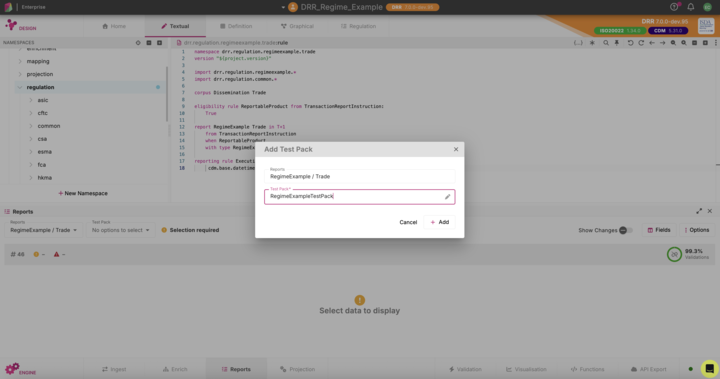
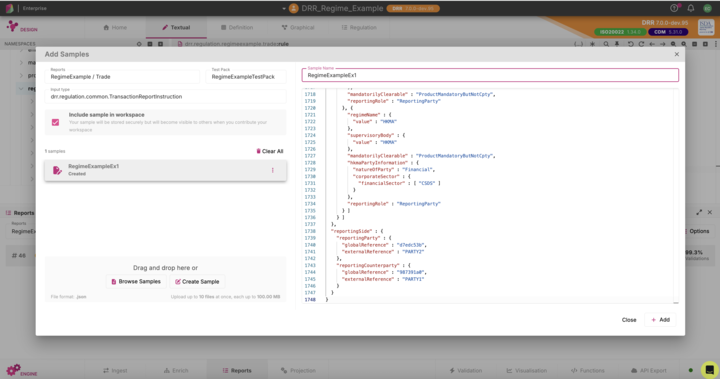
To test the regime and view the report output, you need to add sample data:
-
Open the Test Pack dropdown.
-
Select Add Test Pack.
-
Add sample data to the new Test Pack.
A Test Pack is like a “sandbox” where you can try out the rules and see what the report would look like with real data. This ensures the regime behaves correctly before it’s used in production and also helps non-technical users understand how the rules will play out with real data.
6. Reviewing the output
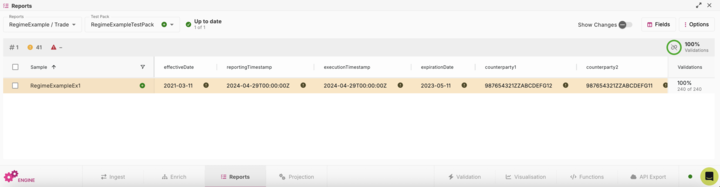
Once the Test Pack is populated, DRRDRR Digital Regulatory Reporting. An industry‑developed, machine‑executable interpretation of regulatory rules that produces consistent, transparent and fully traceable reporting outputs from standardised CDM data. generates the reported fields according to the logic defined for regimeExample.
You can now review and validate the output, ensuring the regime behaves as expected.