Contribution guidelines
These are the guidelines relevant to contributing to DRRDRR Digital Regulatory Reporting. An industry‑developed, machine‑executable interpretation of regulatory rules that produces consistent, transparent and fully traceable reporting outputs from standardised CDM data. with regards to issues and pull requests.
All contributions must be handled through a GitHub issue and approved on the Working Group.
Issues are used as the primary method for tracking any changes to the DRRDRR Digital Regulatory Reporting. An industry‑developed, machine‑executable interpretation of regulatory rules that produces consistent, transparent and fully traceable reporting outputs from standardised CDM data. models. Under the ‘Issues’ tab in GitHub, one of the three types of issues can be selected and populated (each with their own corresponding label):
1. Feature. Used to suggest functional improvements to DRRDRR Digital Regulatory Reporting. An industry‑developed, machine‑executable interpretation of regulatory rules that produces consistent, transparent and fully traceable reporting outputs from standardised CDM data..
2. Task. Used to break down larger features into actionable units of work.
3. Bug. Used to report a bug or unexpected behaviour in the system.
Following approval, contributions are submitted via pull requests.
1. Issue lifecycle
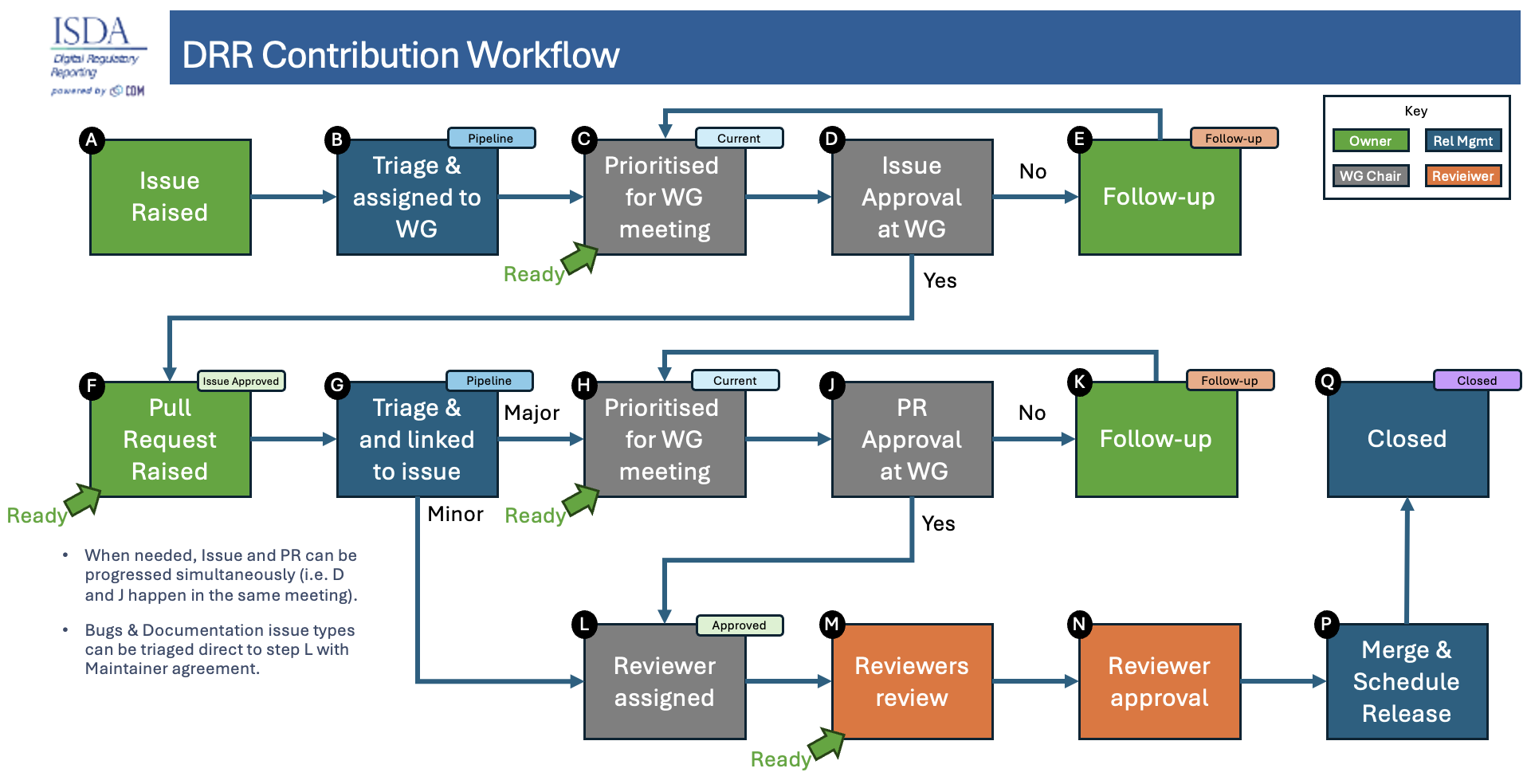
All issue types follow the same general lifecycle.
2.1. Triage
The DRRDRR Digital Regulatory Reporting. An industry‑developed, machine‑executable interpretation of regulatory rules that produces consistent, transparent and fully traceable reporting outputs from standardised CDM data. Release Management team should pick up the new Issue and perform the following activities:
First, review the Issue quality; contact the creator if necessary (or make minor updates directly).
Next, tag the Issue:
- Add appropriate labels:
- “backward-incompatible”:
- “complex”
- “documentation”
- “technical”
- Note that other Label values are available, such as “dependencies” but these are auto-assigned, and should only be used by bots and other automation including RosettaRosetta REGnosys’s proprietary platform used as an execution engine for DRR..
- Assign the Issue to a Working Group by adding as a Project
- If known, the following additional information can be assigned on the Issue
- Assignee: To the user working on the issue, which can be different to the issue owner
- Milestone: If a target Release is specified or clear, select it as the Milestone. For issues with releases on multiple versions, the milestone set is the earliest version milestone, while the PRsPR Pull request of the later versions are linked to their related versions
- Relationships to other issues
Once all the above activities are complete, the “Triage” label is removed.
2.2. Discussion
- Issues are discussed on the working group call where they are either rejected, approved, or moved to follow-up pending further discussion.
3. Pull request workflow
The next section contains more information on the workflow followed for Pull Requests.
3.1. Pull request creation
- We welcome contributions from any member of the DRRDRR Digital Regulatory Reporting. An industry‑developed, machine‑executable interpretation of regulatory rules that produces consistent, transparent and fully traceable reporting outputs from standardised CDM data. repository.
- Pull request must be linked to a specific issue.
- Once the issue has been approved on the working group, the Release Management team will link the PRPR Pull request to the issue
3.2. Reviewing/discussion
- All reviews will be completed using the review tool.
- Reviewers must validate the quality of the PRPR Pull request and the quality of the release note comment.
- A "Comment" review should be used when there are questions about the spec that should be answered, but that don't involve spec changes. This type of review does not count as approval.
- A "Changes Requested" review indicates that changes to the spec need to be made before they will be merged.
- Final approval is required by a reviewer. Merging is blocked without this final approval. Reviewers will factor reviews from all other reviewers into their approval process.
3.3. Responsive
Pull request owners should try to be responsive to comments by answering questions or changing text. Once all comments have been addressed, the pull request is ready to be merged.
3.4. Merge or close
- A pull request should stay open until a reviewer has marked the pull request as approved.
- Pull requests can be closed by the author without merging.
- Pull requests may be closed by a reviewer if the decision is made that it is not going to be merged.
- Pull requests should not be merged unless linked to an issue.
4. Adoption of contributions
Contributions merged into the master branch of the DRRDRR Digital Regulatory Reporting. An industry‑developed, machine‑executable interpretation of regulatory rules that produces consistent, transparent and fully traceable reporting outputs from standardised CDM data. repository will form part of the next relevant DRRDRR Digital Regulatory Reporting. An industry‑developed, machine‑executable interpretation of regulatory rules that produces consistent, transparent and fully traceable reporting outputs from standardised CDM data. release based on the release the issue is tagged against. This must be approved by the Working Group voting participants before it is accepted as a draft and subsequently released.